
Deadly Days: Roadtrip Item Packs: Unlocks and Contents
Unlock Deadly Days: Roadtrip item packs with duct tape, explore the Expedition Kit, and learn how version 1.0 changes affect your next backpack build.
Jump to

How to Unlock Item Packs
Your next backpack combo starts back at camp. Deadly Days: Roadtrip item packs unlock additional gear for future runs, giving you more ways to connect weapons, passive bonuses, and triggered effects. Spend resources such as duct tape at the base workbench to open up those options.
At camp, follow these steps:
- Open the workbench’s permanent unlock menu.
- Select an item pack and read its requirements, cost, and contents.
- Spend the required resources once you meet its conditions.
- Look through the unlock popup to see which items you have added.
The base progression menu also includes facilities such as the merchant and item workbench. Read each entry before spending your duct tape so you can distinguish a pack of new equipment from a facility unlock.
Use the requirements displayed in version 1.0 when planning purchases. The October 29, 2026 update gave packs names and adjusted their unlock requirements and costs.
Expedition Kit Contents
The Expedition Kit contains six items:
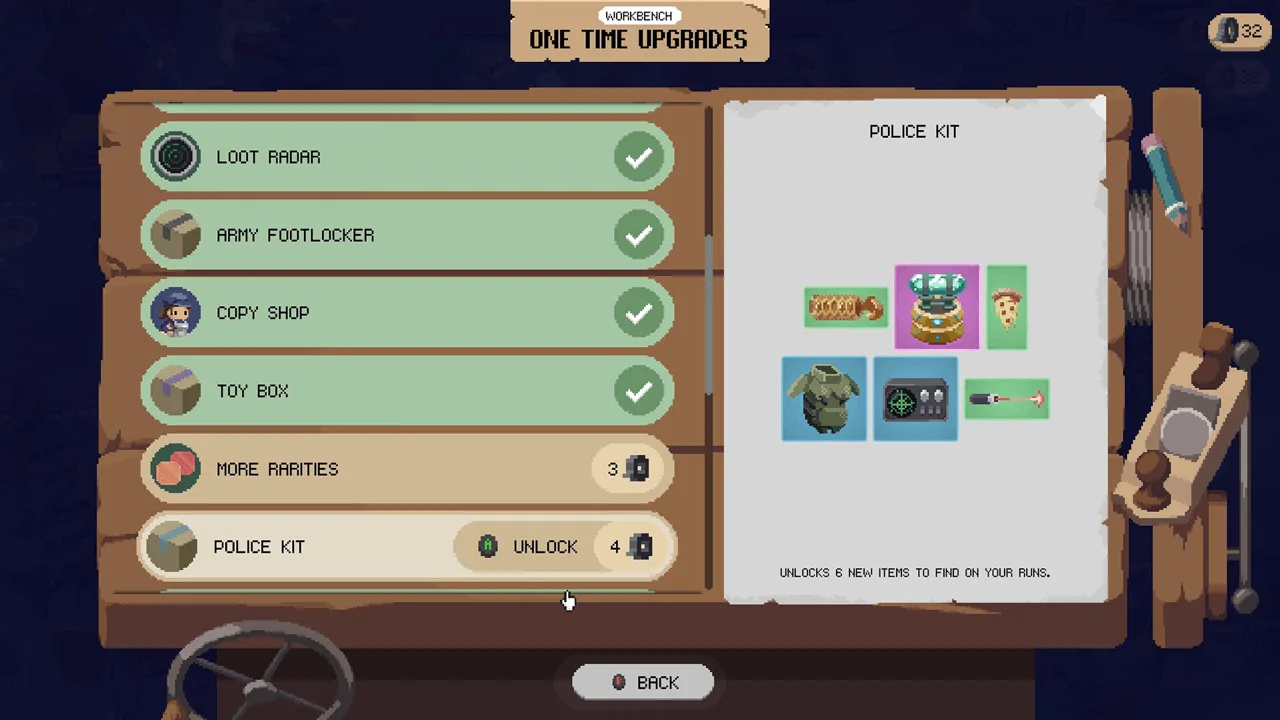 Image: Steam / Pixelsplit
- War drum
- Magnet
- Battery
- Machete
- Katana
- Gem of mirroring
This pack brings together melee weapons and supporting equipment. The Machete performs a small sweeping melee attack, while the Katana received a damage increase across its rarities in version 1.0.
If you want to experiment with melee weapons, inspect this pack’s requirements at the workbench. Once its gear becomes available, read each item’s marked spaces and compatibility before rebuilding your inventory around it.
Backpack placement matters as much as finding another weapon. Supporting items affect particular spaces, so arrange compatible equipment inside those selectors and check that the synergy link activates. Leave room around a weapon for the effects you want to stack onto it.
Getting Duct Tape for More Unlocks
Duct tape funds workbench progression, and the base also lets you exchange apples for it. Apples have another use: permanent stat upgrades, including maximum health and attack speed.

Before exchanging apples, compare the next pack’s cost with the stat upgrades you could purchase. If you are struggling to survive long enough to collect useful loot, consider investing in those permanent upgrades before expanding your equipment choices.
Version 1.0 changed several relevant rewards:
- Some achievements award apples or duct tape at the base.
- Bosses drop +1 duct tape from MKing response level 3 and +2 from level 5.
- The HQ end boss’s base duct tape drop decreased from 5 to 3.
- Reaper drops 1 duct tape.
Check achievement rewards while planning your next unlock. When deciding whether to push farther into a run, weigh the extra loot against your ability to reach the bus safely; nighttime threat keeps rising while you remain outside.
Version 1.0 Changes That Matter for New Gear
The full release expanded the combined weapon and item roster to over 110, adding 10 weapons and 16 items. Five of those new weapons are available only through crafting.

Pack unlocks, crafting, and backpack arrangement all contribute to your equipment options. At the item workbench, the recipe list now prioritizes what you can craft and displays ingredient quantities and rarities. Check that list before selling equipment you could use in a recipe.
Several new items reward careful placement:
| Item | Effect | Placement detail |
|---|---|---|
| Hammer | Upgrades marked items by one rarity at the end of the day | Upgrades cannot exceed the Hammer’s own rarity |
| Hand Mirror | Copies effects that hit a marked item onto the marked item opposite it | Arrange both marked targets to receive the copied effect |
| Cogwheel | Triggers other marked triggerable items when one activates | Each item can trigger only once per chain |
| Tesla Coil | Fires a projectile every 3 seconds that can electrocute | Additional bounces for marked lightning items require an even number of marked electric items |
Check selectors again after merging or rearranging equipment. Version 1.0’s Auto Equip considers synergies when choosing an open position, but inspect the resulting layout before committing to your next stop.
In co-op, selectors can also mark equipment in the other player’s backpack. Coordinate both layouts when placing support items, especially when the backpack grids touch.
Item Packs and the Supporter Pack
Workbench item packs belong to the game’s progression system. The separately sold Supporter Pack includes a flagpole for your base and two dog companions that can accompany you on runs.
For new equipment options, spend your attention on the base workbench’s unlock menu. For the companion and base extras, visit the Deadly Days: Roadtrip Supporter Pack on Steam.
Continue with
 Deadly Days: Roadtrip Item Workbench Crafting GuideUse the Deadly Days: Roadtrip item workbench to craft weapons and gear. Learn how recipes, ingredient rarity, and backpack synergies shape your next build.
More in Items

Deadly Days: Roadtrip Crafting Recipe Guide: Weapons
Find your Deadly Days: Roadtrip crafting recipe for the Minigun and Rocket Launcher, plus ingredient rarities and tips for planning your next weapon build.

Deadly Days: Roadtrip Duct Tape: How to Get and Use It
Get Deadly Days: Roadtrip duct tape from bosses, achievements, and the Reaper. Learn the 1.0 reward changes and how tape connects to workbench progression.
Deadly Days: Roadtrip Items List: 1.0 Gear & Weapons
Explore the Deadly Days: Roadtrip items list with all 16 new 1.0 items, 10 added weapons, crafting details, and backpack synergy tips for your next run.
Continue exploring
Join the community
Official channels for news, updates and player help: